

Documents, Images, and Knowledge Collections
You can share documents, images, and knowledge collections in chat so the AI can analyze, summarize, or use them as a basis for its responses.
Adding Documents
Section titled “Adding Documents”Supported Formats
Section titled “Supported Formats”| Format | File Type | Typical Use |
|---|---|---|
| Reports, decisions, forms | ||
| Word | .docx | Letters, templates, drafts |
| PowerPoint | .pptx | Presentations |
| Excel/CSV | .xlsx, .xls, .csv | Tables, lists, data |
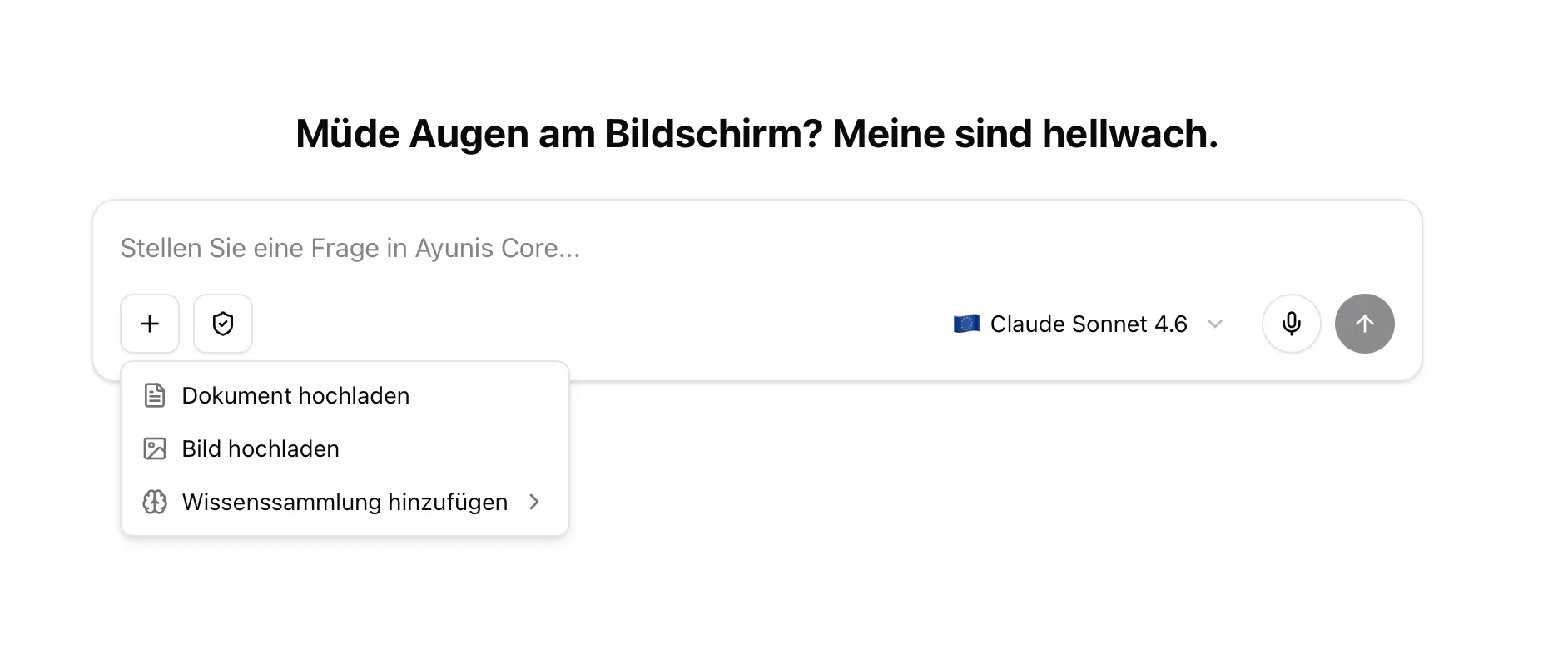
How to Add a Document
Section titled “How to Add a Document”- Click the plus icon (+) in the input area
- Select Upload document
- Select the desired file from your computer
- Wait until the file is uploaded
- Ask your question about the document
Practical Example: Summarize Document
Section titled “Practical Example: Summarize Document”You have a 30-page PDF of a committee meeting minutes. Upload it to the chat and write:
“Summarize these minutes. List the most important decisions and open tasks with responsible persons.”
Adding Images
Section titled “Adding Images”Supported Formats
Section titled “Supported Formats”JPEG, PNG, GIF, and WebP – maximum 10 MB per image, up to 8 images per message.
How to Add Images
Section titled “How to Add Images”- Click the plus icon (+) in the input area
- Select Upload image
- Select the desired image from your computer
What the AI Can Do with Images
Section titled “What the AI Can Do with Images”- Describe content – e.g., explain what’s in a photo
- Read text in images – e.g., extract text from a photo or screenshot
- Analyze – e.g., evaluate diagrams or plans
Practical Example: Analyze Image
Section titled “Practical Example: Analyze Image”You receive a photo of a damaged playground attached to a defect report. Upload the image to the chat and ask:
“Describe the visible damage in this photo. Create a list of defects for the public works department.”
Adding a Knowledge Collection
Section titled “Adding a Knowledge Collection”You can add a knowledge collection directly to a new chat so the AI can access the documents it contains:
- Start a new chat
- Click the plus icon (+) in the input area
- Select the desired knowledge collection
The AI can then answer questions based on the documents in that knowledge collection — without you having to upload the files individually.
Tips for Working with Files
Section titled “Tips for Working with Files”- Attach relevant files – Only upload documents relevant to your question
- Ask targeted questions – “Summarize pages 5–8” is better than “What’s in the document?”
- Consider data protection – Check if the document contains personal data and use anonymous mode if needed
Next Steps
Section titled “Next Steps”- Knowledge Collections – Create and manage knowledge collections
- Anonymous mode – Protect personal data in documents