

Editor
Edit, format, and export AI-generated documents as Word or PDF files – directly from the chat, without switching applications. Turn a chat response into a ready-to-send letter, a polished report, or a statement in just a few clicks.
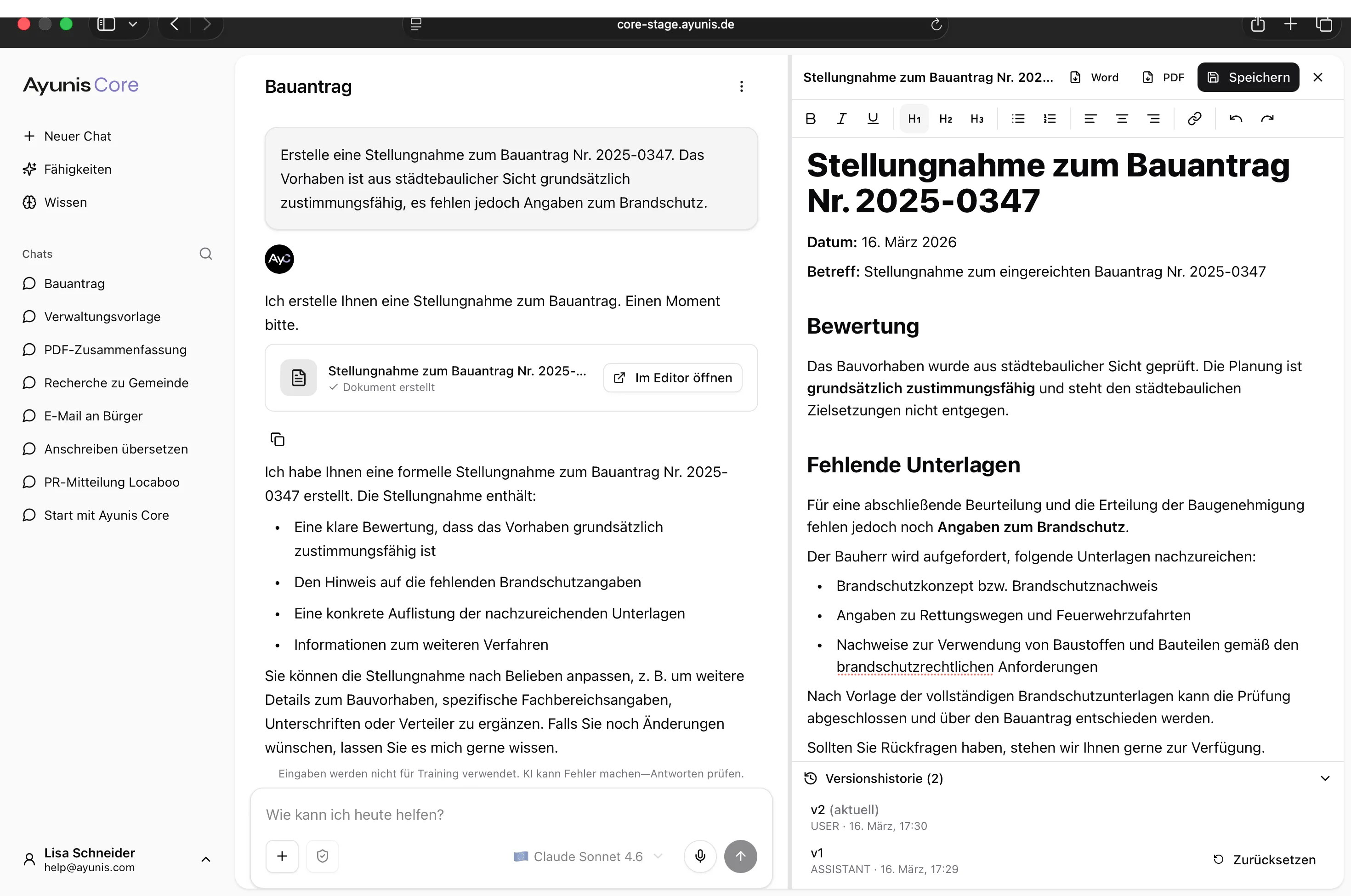
How to Open the Editor
Section titled “How to Open the Editor”- Send a message in the chat that generates a document – e.g., “Create a brief description of our project”
- The AI creates the document and displays it in the chat
- Click Open in Editor
The Editor opens as a side panel to the right of the chat.
Editing a Document
Section titled “Editing a Document”You can freely edit the text in the Editor. The formatting toolbar offers the following options:
| Feature | Description |
|---|---|
| Bold, Italic, Underline | Text formatting |
| H1, H2, H3 | Headings in three levels |
| Lists | Numbered and bulleted lists |
| Alignment | Align text left, center, right, or justify |
| Link | Insert a hyperlink |
| Undo / Redo | Undo or redo recent changes |
Exporting a Document
Section titled “Exporting a Document”Using the buttons at the top right of the Editor, you can export the document:
- Word – Creates a .docx file for download
- PDF – Creates a PDF file for download
Saving a Document
Section titled “Saving a Document”Click Save to save the current version of the document.
Version History
Section titled “Version History”The Editor automatically keeps track of different versions of your document. In the Version History section at the bottom of the Editor, you can see:
- Which versions exist (e.g., v1, v2)
- Who created each version (you or the AI)
- When each version was created
Use Reset to revert to an earlier version if you want to discard changes.
- Generate first, then refine – Let the AI create an initial draft and then adjust it in the Editor
- Use versions – Save intermediate states before making major changes
- Export directly – Use the Word or PDF export to share the finished document
Practical Example
Section titled “Practical Example”You need to write a statement regarding a building project. Ask the AI in the chat: “Create a statement on building application No. 2025-0347. The project is generally approvable from an urban planning perspective, but fire safety details are missing.” The AI creates a draft. You open it in the Editor, add the file reference number, adjust the wording, and export the finished document as a PDF.